IBM Content Manager Migration Services
We connect to the mainframe and get your documents and index data out, converted and reconciled
What Is IBM Content Manager?
IBM Content Manager for z/OS is IBM's enterprise content repository for the mainframe. For decades it has stored the high-volume document images, statements, and records behind banks, insurers, healthcare payers, and government agencies, often alongside the core business systems that run on the same mainframe.
Content Manager keeps its catalog in a library server database on DB2 for z/OS and stores the documents themselves as objects, typically managed by the mainframe's Object Access Method (OAM) across disk, tape, and other storage tiers. Content is organized into item types with attributes, child components for repeating data, multiple parts per item, links and folders, versions, and access control lists.
Those same strengths make it hard to leave. The content is locked behind mainframe security, stored in mainframe formats, and spread across storage that was designed for retention rather than bulk export.
Why Organizations Migrate Off IBM Content Manager
Mainframe modernization programs, the rising cost of MIPS and storage, retiring mainframe skills, and the push to move documents to the cloud are the usual drivers. In many organizations Content Manager is one of the last workloads keeping a mainframe footprint alive, so getting the content out is what lets the rest of the modernization finish.
Specific Technical Challenges
A mainframe repository brings challenges that distributed ECM migrations never face.
Getting Connected to the Mainframe
Access runs through mainframe security (typically RACF), DB2 for z/OS, and tightly controlled network paths. Extraction has to work within those controls and with the mainframe team, not around them.
EBCDIC and Mainframe Data Types
Catalog data and text content are stored in EBCDIC code pages, with mainframe date and numeric formats. Everything has to be converted precisely, or names, account numbers, and dates arrive corrupted.
AFP, MO:DCA, and Legacy Image Formats
Documents are often stored as AFP print streams, MO:DCA and IOCA images, or older TIFF variants that modern platforms cannot display. They need to be converted to PDF or standard images with nothing lost in rendering.
Item Types, Child Components, and Parts
An item can carry repeating child components and several parts, and items link into folders and other items. That structure has to be flattened or remapped carefully so related content stays together in the target.
Objects Spread Across Storage Tiers
Older objects may live on slower storage tiers, including tape. Recalling millions of them has to be planned and sequenced so the extraction runs efficiently and does not disrupt production.
Batch Windows and MIPS Cost
Mainframe capacity is shared and metered. Extraction has to be scheduled around batch windows and online peaks, and kept efficient enough that it does not drive up the mainframe bill.
How Merkh Helps
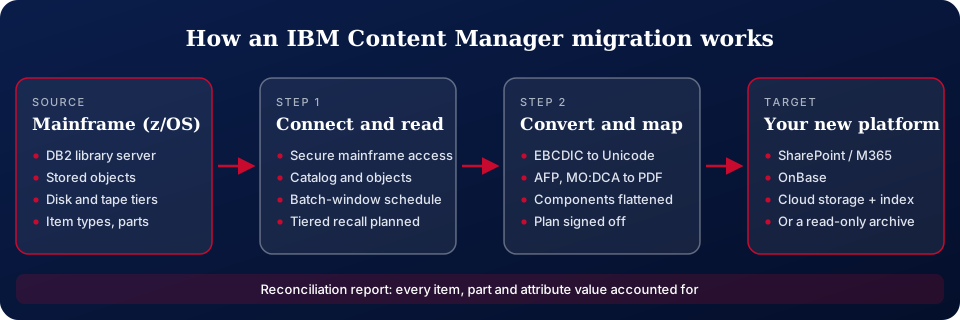
Merkh connects directly to the mainframe and gets the data out. Working with your mainframe and security teams, we read the Content Manager library server catalog in DB2 for z/OS and retrieve the stored objects, then convert EBCDIC data, mainframe dates and numbers, and AFP, MO:DCA, and legacy image formats into standard, searchable documents. Item types, attributes, child components, parts, links, and versions are mapped to the target so every document keeps its context. Extraction is scheduled around your batch windows and peaks, and every run ends with reconciliation reporting that accounts for every item, part, and attribute value.
Where we move IBM Content Manager content
We migrate IBM Content Manager to SharePoint Online and Microsoft 365, OnBase, cloud object storage with a searchable index, other ECM platforms, or a read-only archive that lets you retire the workload entirely. The target is chosen to fit your retention rules and how the content is actually used today.
An IBM Content Manager Migration, Step by Step
Connect and assess
With your mainframe team, we set up secure access and inventory item types, volumes, formats, and storage tiers.
Map
Item types, attributes, and components are mapped to the target, and you sign off on the plan.
Extract and convert
Objects are read in scheduled runs, converted from mainframe formats, and loaded in validated batches.
Reconcile
Every item, part, and attribute value is counted and checked against the mainframe source.
IBM Content Manager Migration FAQ
Related: ApplicationXtender migration · FileNet migration · ECM migration services · financial services · free migration guides
Get a Free IBM Content Manager Migration Assessment
Let us walk you through your next IBM Content Manager conversion project. Contact us for a free consultation.
Contact Us Today